Epiq Discover Version 3.9.3 Release Notes (July 2024)
This release contains updates and improvements to Epiq Discover. The following notes highlight new enhancements to Epiq Discover and provide a list of bugs addressed in this release.
Release Highlights
Release 3.9.3 contains the following features, as well as additional enhancements listed in this document. The following sections contain details about these features and enhancements.
-
Viewer enhancement. In Inspect and Review, you can now set the maximum document size that you can view in the native viewer.
-
Document List. In Inspect and Review, you can now modify the number of documents displayed per page.
-
Transfer to Relativity. Enhanced the Transfer to Relativity job performance by improving the handling of any job fragment that runs for more than 2 hours.
Enhancements in Release 3.9.3
This release contains the following enhancements and updates.
General
Retention of ability to retry jobs
In the JOBS and Jobs Overview pages, you can view the status of jobs, including failed jobs. As of this release, when displayed, the Retry icon for a failed job is available for up to 30 days. (829244)
Job page pagination updates
Updated the Jobs Overview page to return 50 jobs per page. This page previously returned 100 jobs per page. Also, implemented pagination in the following pages to return 50 jobs per page. Use the pagination tools at the bottom of the page to go to the first, previous, next, or last page. (406594, 838598)
-
JOBS page in Inspect or Review
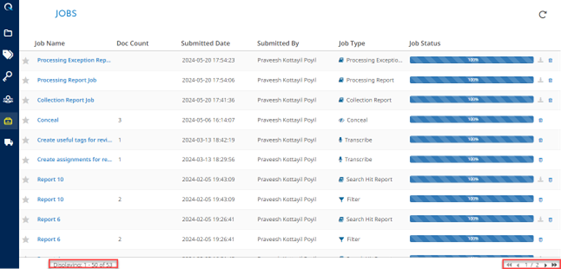
-
JOBS page for Projects
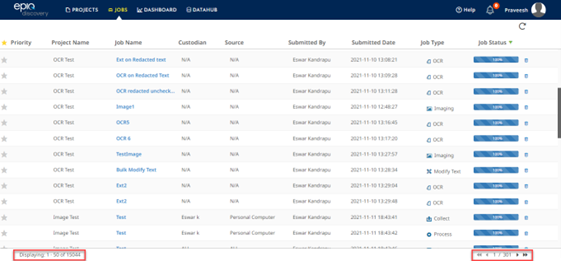
To search for a particular job in the JOBS page in Inspect and Review, Cross Projects Job page, and Jobs Overview page, hover the mouse on a column header so the filter icon appears, shown in the following figure. Then, select the icon and choose how to filter to find the job you need. (874954)

Inspect/Review
Document List: Modify document per page
In Document List, added the ability to modify the number of documents displayed per page. To modify the documents to display per page, at the bottom of the Document List, select a number from Documents per page. The higher the number, the more time it might take to display.
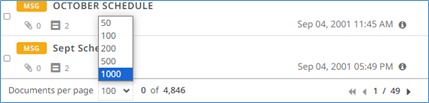
By default, the Document List displays 50 documents per page. When you select a number from Documents per page, the system applies the setting to Inspect and Review.
When you change the document per page in a project, the setting is cached and applies to all projects, including new projects, until you change it or clear the browser cache. Clearing the browser cache resets the default to displaying 50 documents per page. (750011, 758500)
Transfer to Relativity update
Enhanced the Transfer to Relativity job performance by improving the handling of any job fragment that runs for more than 2 hours. The system skips the job fragment that runs for more than 2 hours. If this occurs, the system cancels the transfer of the files associated with the skipped fragment and then continues and completes the transfer of other files. To view any skipped documents after the job completes, view the job in the Jobs page and download the Failed Transfer report. (773392)
Administration
Document List: Set the maximum document size for native viewer
You can now set the maximum document size that you can view in the Document List native viewer in Inspect or Review. The default maximum document size is 50 MB. You can specify a value between 10 and 250 MB. This feature applies only to the native viewer and does not affect the text or image viewers. It is also not applicable to Audio or Video files. (436806)
Modify the Maximum document size for natives in the Viewer
To change the maximum document size from the default, perform the following procedure.
-
In the Home page, click and then select PROJECT SETTINGS.
-
In the PROJECT SETTINGS tab, in the Document List Settings>Maximum Document Size to Load in Viewer field, enter a value between 10 and 250 MB.
-
Click Save.
When a native exceeds the maximum size for the Viewer
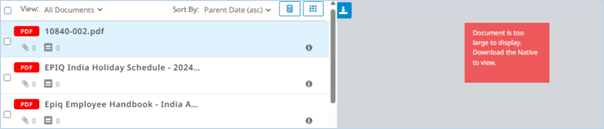
In the Document List, when you view a document whose size exceeds the specified maximum value, the viewer displays a message indicating that the document is too large to display. In this case, if you want to view the document, click  to download the file and view it locally.
Default maximum document size for natives in new projects
When creating a new project, including when you copy an existing project, the system sets the maximum document size setting to the default value of 50 MB.
Desktop Client
Loading update
Desktop Client loading now supports date values earlier than 1970. (843873)
Bugs fixed in Release 3.9.3
The following bugs were resolved in this version.
|
Number |
Title |
|---|---|
|
573614 |
Loading | Data Name for a partially failed loading job is not displayed in Search Builder |
|
680642 |
Processing | Incorrect extraction from Word document for bitmap |
|
771458 |
Production | Downloading produced children incorrectly named using the parent bates number |
|
777407 |
When the document is redacted and moved to next page, empty page with a scrolling symbol is visible |
|
782349 |
Near Dupe and Threading Job completed with error: "The fragment timed out returning a failed app result" |
|
798979 |
Redactions | Not being retained on creation in undocked and docked viewer |
|
818008 |
Redaction | Manual redaction 'Filled Rectangle' is not saved in an oversized PDF |
|
820147 |
Autoload to Relativity | Large native files are failing to import documents into Relativity with the error 'An unexpected error has occurred retrieving document metadata.' |
|
830840 |
Mobile Collection | Fragment timed out while mobile collection for the XML file |
|
833497 |
Imaging | Cutoffs for Speaker notes when comments are ON and view as Both |
|
837634 |
DataHub | Documents are missing in the Images folder when downloading Production from DataHub |
|
844897 |
Collection | Mobile Collection error logs show messages that do not have timestamps. |
|
845046 |
Search Hit Report | For an existing filter job that had no previous keywords, using Refresh Filter in the Keywords panel could result in the Search Hit Report displaying a row without a search term. |
|
845906 |
Collection | Mobile Collection error logs show error occurred during proxy main - No value specified for parameter |
|
848599 |
Search Builder does not load quickly if there are large number of filter jobs. |
|
850658 |
Viewer | Production Image should be downloaded with begin bates |
|
852200 |
Document List | CTRL + [arrow key] shortcut to navigate between documents is not working |
|
852744 |
Client | Unable to change client name when a project is in Archive or Deletion state |
|
855474 |
Imaging | Images of .pptx files in widescreen format are cutoff |
|
855943 |
Export Original Images | In the OPT file downloaded from DC client, the order of page numbers for multipage documents not in ascending order if the OPT is exported to a Network Drive folder. |
|
856527 |
Filter job | Fixed an issue where, when you rerun an existing filter job with keyword modifications using Refresh Filter in the Keywords panel, the previous search hits are not cleared. Therefore, searching on the Filter job does not return the correct documents. |
|
858363 |
Fixed an issue where the system could fail to show an error message when a Filter job fails. |
|
858686 |
M365 | Collection | Collection job fails with error " Error executing the request" |
|
858876 |
Loading | Data Name for a Completed with error loading job is not displayed in Search Builder |
|
860332 |
Production Deletion | Deletion job not completing successfully |
|
860490 |
Desktop Client | Create Custodian | Display Disallowed Characters Message Consistently with Web |
|
864012 |
Search Builder | Search Builder does not load when the field name starts with '_' and has no choices |
|
865848 |
Search Builder | Search Builder Stuck on Loading Bar when filter is created with special character |
|
867822 |
Reprocessing | Deduplication job sometimes does not finish while Post Processing job finishes |
|
868085 |
Search | Display Name in Search Builder is translated into Searchable Name in search bar |
|
868495 |
Loading | Failed to upload document Native files when the same file name is loaded with a different document number |
|
869326 |
Production Export | portfolio PDF | More images in the export than expected and more lines in the OPT than expected |
|
869387 |
Search |Search builder | User created field names are not searchable throws syntax error "Cannot Parse the syntax. Check the syntax guide and modify your search" |
|
873951 |
Review | Coding form - Custom date field cannot populate and save /save next in the undocked viewer |