Navigate Epiq Discover
Epiq Discover provides the ability to view information in two specific forms. When granted permission, you can view information about all projects in the client for more global information. You can also drill into each project to view all phases of the project down to specific jobs.
- The Home page provides an aggregate view of all projects to which you are granted permission.
- Project pages provide access to data and jobs. Each individual project consists of data sets in specific phases of work. When you manipulate data in any way, Epiq Discover creates a job to track that work. Jobs track when you collect, process, filter, promote, create a theme wheel, run reports, and perform any action that produces output.
Navigate the Home page
When you log in, the Home page appears. This page lists information about all of the projects in your provided permissions and provides a link to the projects dashboard. The following figure shows the Home page left navigation menu and titlebar.
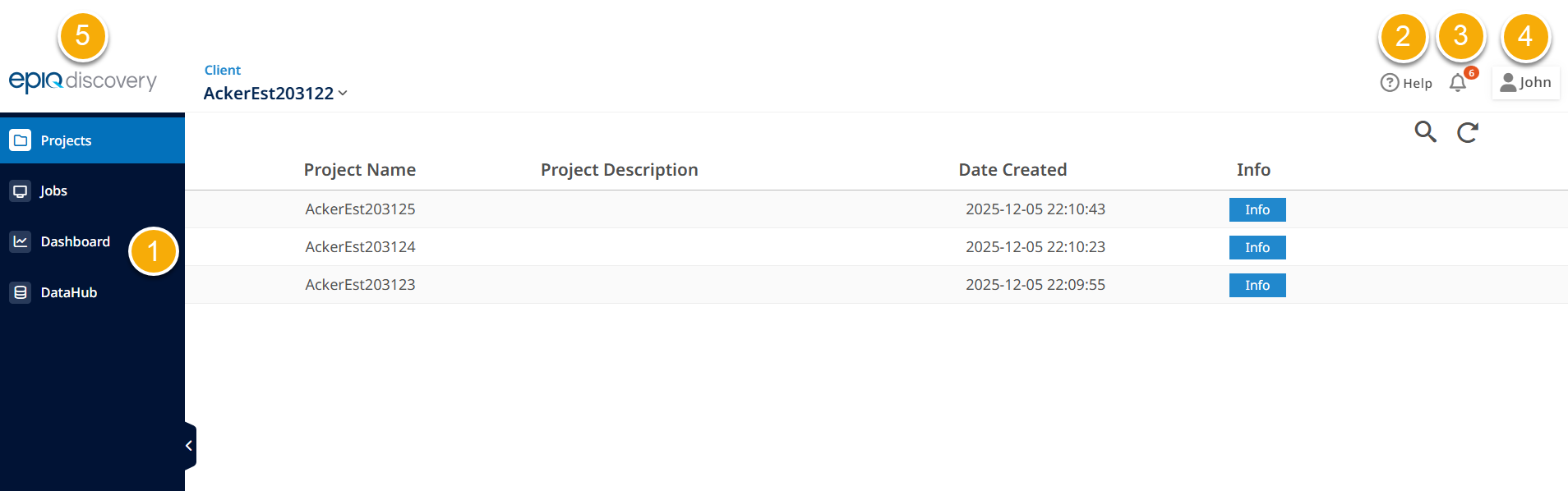
- Left navigation pane provides the following.
- displays summary information about your projects. This page enables you to manage project-wide settings or to drill down to a specific project.
- shows job detail and status for all of your projects.
- shows up-to-date statistics about projects in the client, including number of projects, users, usage, and data size.
- DataHub is a file repository in Epiq Discover from which you can upload data or download files from your local computer.
-
Click
 to quickly search for information about product functionality, including step-by-step instructions on how to perform tasks.
 - Alerts enable you to set and view program alerts and notifications. This icon also displays the current number of alerts.
- Account Menu provides actions that enable you to run project reports, update client-wide settings, and manage your own user settings. Use this menu to log out of the program. In addition, your user name is displayed on it.
-
Click Epiq Discover logo to navigate to the page that appears when you log in.
Navigate your project
After selecting an individual project from the Home page, the Main Menu and titlebar enable you to work your data through the discovery process. You can also run reports on the project's progress. The following figure shows the Main Menu and titlebar within a project.
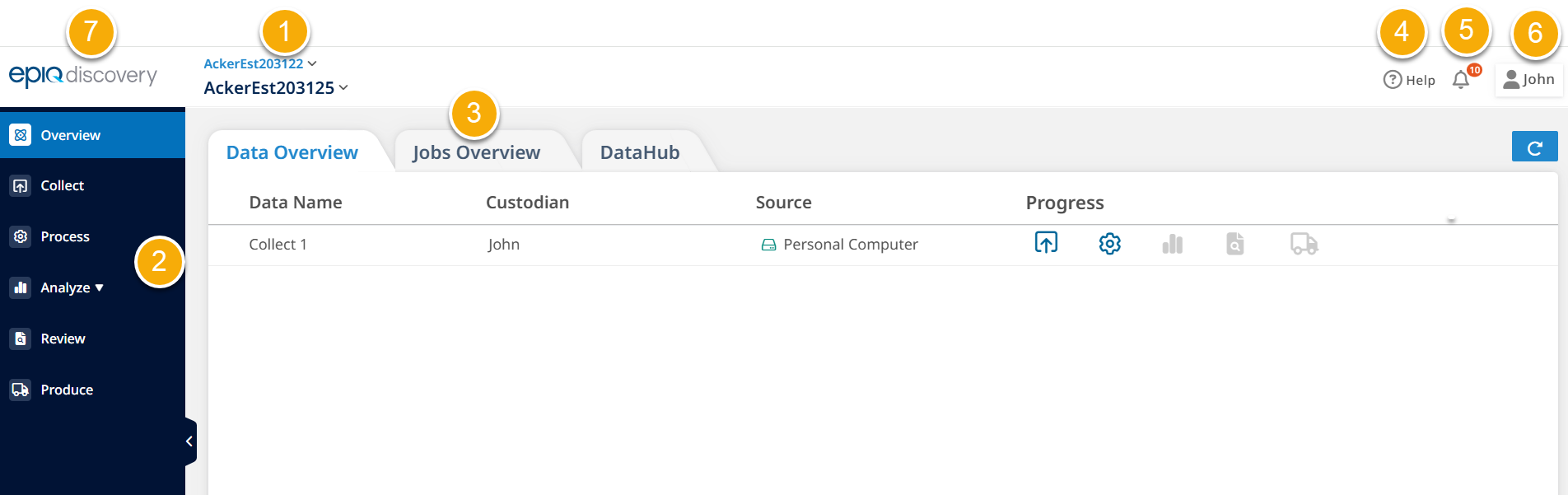
- Within a project, you can view the name of the selected project. You can also toggle between individual projects.
- Main Menu provides the actions needed for each phase of your project.
- - Assemble data from the selected source information.
- - Build and categorize the collected, unstructured source files into indexed content built for intricate searching.
- - Analyze, filter, promote, and export your discovery documents.
- - Enable reviewers and specialists to distribute and manage tasks as they comb through the information .
- - Provide the outcome.
- Click Overview in the Main Menu to view the Overview page. From the Overview page, you can navigate to the Data Overview, Jobs Overview, and DataHub pages.
- Click Apps to access other Epiq suite applications directly from Epiq Discover.
-
Click
to quickly search for information about product functionality, including step-by-step instructions on how to perform tasks. - Alerts enable you to set and view program alerts and notifications. This icon also displays the current number of alerts.
- Account Menu provides actions that enable you to manage project specific settings and your own user settings. Also, you can generate project reports and view the project dashboard. Use this menu to log out of the program. Your user name is displayed on it. Also, you can navigate to the Home page by clicking Project List.
- Click Epiq Discover logo to navigate to the page that appears when you log in.