Data Assessment page
Use the Data Assessment page to apply filters to cull the data set and generate a breakdown of data for analysis and review. The Data Assessment page is inactive until you process any data. To verify that this feature is enabled, refer to Enable Data Assessment page.
-
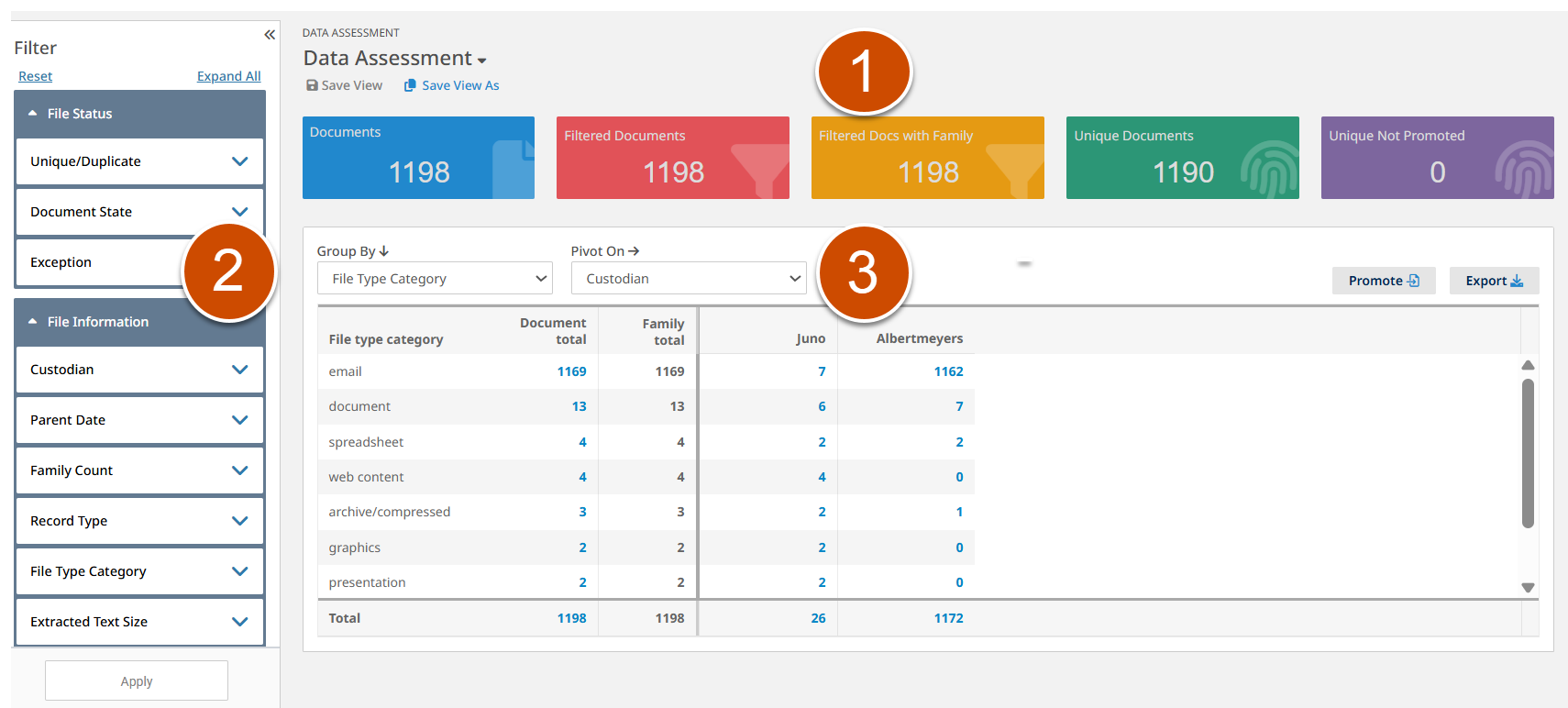
. Summary information at the top of the page includes the following information.
-
. Total number of documents in the project.
-
. Number of filtered documents without family. Hover over it to view the percentage of filtered documents without family within the total documents.
-
. Number of filtered documents with family. Hover over it to view the percentage of filtered documents with family within the total documents.
-
. Number of unique documents within the filtered documents with family. Hover over it to view the percentage of unique documents within the filtered documents with family.
-
. Number of documents not promoted within the unique documents. Hover over it to view the percentage of documents not promoted within the unique documents.
Click a summary card to view the list of documents in the Inspect page.
-
-
. When you do not select any options on the pane, the totals in the Data Assessment page reflect all the data. You can modify this page information using the , , and options on the pane. For example, when you select the checkbox in >, the summary information and pivot table show totals for only promoted data.
-
. You can view the detail information about the filtered documents in the pivot table. Click a cell in the table to view the documents in the Inspect page.
The following figure shows an example Data Assessment page.
The following list provides related topics.