About Privilege Detection
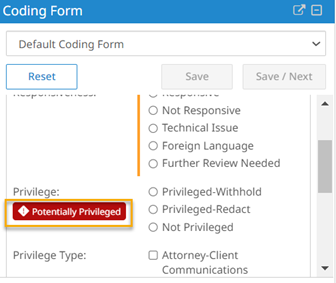
The feature can assist Review teams in identifying potentially privileged email documents. When enabled, the job runs automatically after documents are promoted. This job automatically analyzes the domain present in the email header against a carefully curated global list of law firm domains to determine whether it is potentially privileged. When a match is found, you see the displayed in the Coding Form, as shown in the following figure.
When you mark a domain as privileged or not privileged in the Domain Analysis page, the system updates the reference domain list used to automatically detect privileged domains.
You can search for documents using the field. This means you can search, export, load, use it in coding forms, and generate results with it.
Enable Privilege Detector
The Privilege Detector feature is not enabled by default for new projects. Contact the Client Success team to enable the feature.
Related topics
The following list provides related topics.