Project Dashboard
shows up-to-date statistics about the current project. In addition to summary information, the dashboard includes reviewer metrics information.
Project Managers and Client Administrators can view Project Dashboards. To view this dashboard, in the Account Menu, select Project Dashboard. The following figure shows an example Project Dashboard.
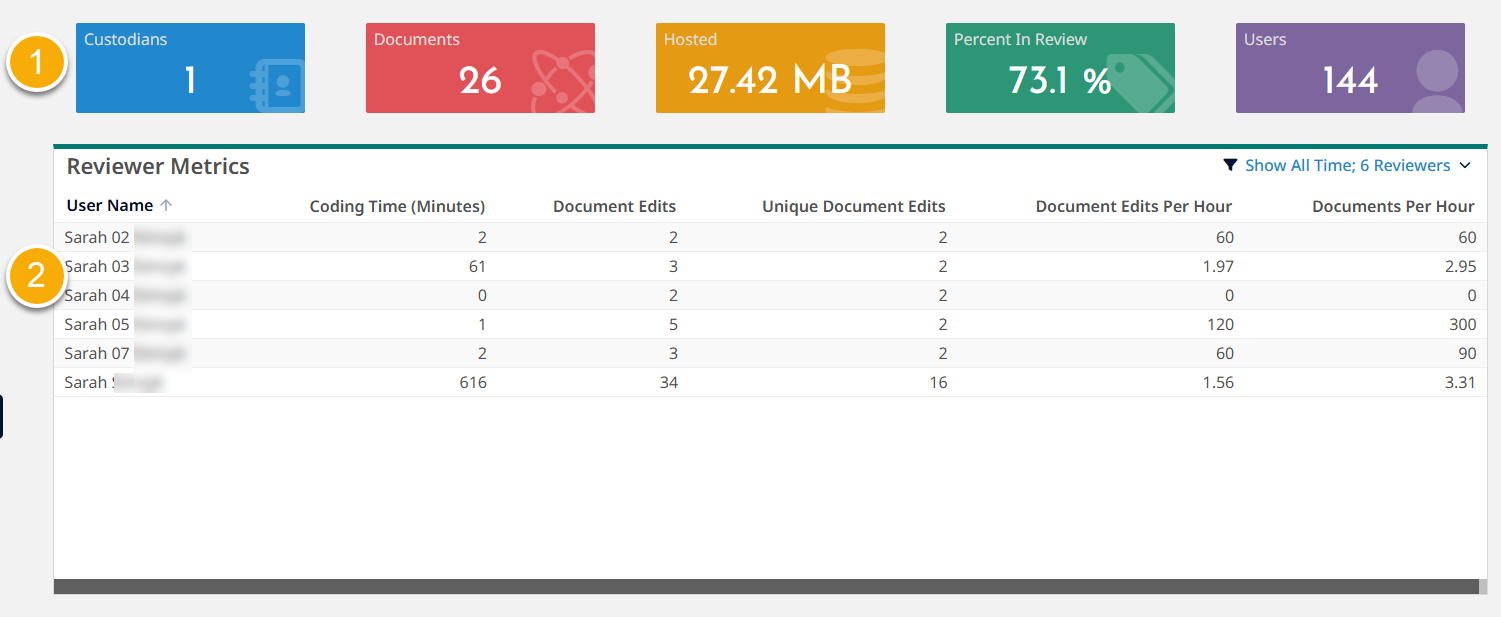
- Summary information at the top of the page includes the following project-specific information.
- - total number of active custodians in the project.
-
- total number of processed documents in the project. This number does not include deleted documents, which are immediately removed from this total.
Note that the displayed document count in the project might not align with the document count in INSPECT if there are collected documents that have not been processed because INSPECT only shows and counts processed documents. - - total hosted space, including documents in search index, database, and file hosting. This number includes loaded documents and concealed documents. This number does not represent peak hosting.
-
- percent of promoted documents in the project. This number includes loaded documents and concealed documents. This number does not include deleted documents, which are immediately removed from this total.
Percent in Review = (total number of documents in Review / documents in the project) X 100. - - number of active users with access to the project. Active users include the Client Administrator, Project Manager, Litigation Support, Review Manager, Senior Reviewer, and Reviewer roles.
- table provides insights into reviewer productivity and overall review speed. For more information about reviewer metrics, refer to the following topics.